
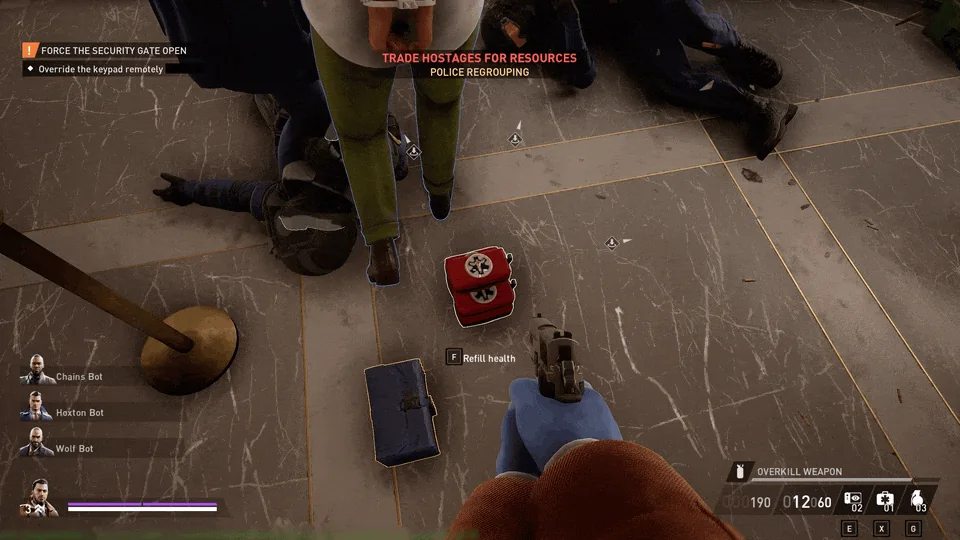
Pick up a First Aid Kit or Armor Repair Kit during a heist, check the dedicated consumable slot in your HUD, and use the bound Consumable action when you need it. First Aid Kits restore health. Armor Repair Kits act on your armor plates. The carried slot holds one kind at a time, and you can also place a carried kit for another player to use. Starbreeze's consumables system explanation · Release notes
Pick up a kit and check the carried slot
Find a loose kit, approach it and use the pickup prompt to put it in the consumable slot. Pickups can be found in parts of a heist or obtained during hostage trades. Enemy drops also exist, and the 3.10 known issues note that their outlines may only appear when you move close. Use the HUD icon to confirm which type you are carrying before you move on. 3.10 notes
You can stack multiple kits of the same type, but you cannot mix first aid and armor repair in one carried stack. If a kit on the floor differs from your current stack, deal with the current stack before trying to take the other type. Look at your current HUD or armor frame and equipped skills for the applicable capacity because setups differ. The early developer blog described the launch design before later armor and skill changes, so its proposed limits should not be applied universally now.
Use the Consumable action or place a kit on the ground
The developer documents two uses for a carried kit: apply it straight from your inventory or place it so another player can interact with it. For the control, read the key or button shown beside the consumable HUD slot or in your current input settings. The original controller release moved consumables to the old OVERKILL call-in action and moved that call-in to a held weapon-switch button, so an old guide can point to the wrong action. If you changed layout or remapped your controls, follow your own bindings. Controller change in 1.3.0
When sharing a kit in a group, place it within reach of a teammate from cover. Confirm the item is on the ground and let the other player use its in-world prompt. If you intend to heal yourself immediately, use the action to apply it directly instead of treating it as a deployable bag. Check that you are looking at the consumable slot and not the throwable or equipment slot, especially when the HUD shows several similar icons.
Choose health recovery or armor repair
First aid targets missing health. Some skills or armor effects can alter how recovery works, and the Survivalist frame is a documented example of equipment that strengthens First Aid Kit healing. If a build converts a qualifying health gain to Adrenaline, check the actual skill or item behavior at full health. The Adrenaline guide explains the extra buffer and looks at confirmed sources separately. Survivalist frame notes
Armor repair acts on your plate system, which changed with Armor 2.0. If you are waiting for a plate to recover, verify the plate type and damage state rather than expecting the same response from every frame. If you are comparing two effects, use the same armor setup and take a look at the HUD before and after the kit. That makes it easier to recognize what the kit changed. Armor 2.0 notes
Distinguish pickups from deployables and other supplies
A Medic Bag or Armor Bag is an equipment deployable used through its own slot and deployed for the crew. A carried first-aid or repair kit is a heist pickup that follows you in the consumable slot until you use or place it. Some other pickups, such as ammunition, have their own interaction behavior and do not behave like stacks of health and armor kits. If you are building for team support, check the beginner equipment guidance and your selected deployable before counting on drops.
For a simple team setup, check each player's needs before picking up a stack. A teammate with damaged plates may benefit from a repair kit while another is missing health. During a safe pause, check who already has which item and whether there is room in their slot, then place or leave kits where they can reach them. This also prevents an entire crew from walking away from a pickup each thought the other had used.
Why pickup or use might appear blocked
When you cannot take a pickup, compare the ground item's type with your carried type and capacity. If the HUD action appears unavailable, check whether your intended input is for using the consumable, placing it, or using a completely different equipment slot. Patch 3.10 also listed inconsistent graying of HUD keybind buttons, so check an actual use attempt from a safe position rather than interpreting the icon by itself. If the problem repeats on a clean client, record your platform, input layout, frame and exact item and compare against the update archive.
Check how the kit entered the heist
The original consumables announcement distinguishes kits found on the map from ones received by trading hostages. For a map pickup, interact with the actual kit when it appears and read the HUD afterward. During a hostage trade, wait until the supplies have appeared, then decide which teammate needs the type on the ground. If you have no use for the current drop, leaving it reachable may be better than clearing the last item from a compatible stack.
A drop and its outline also have separate behavior. In 3.10 Starbreeze listed enemy-drop outlines appearing only at close range as a known issue, so no outline from across the room is weak evidence about whether a kit exists. Approach during a safe phase and look for the actual prompt. If you can see it but still cannot take it, start with slot type and capacity instead of changing your bindings first.
Run a quick before-and-after check
Use the same frame and skill setup when comparing a kit before and after a patch. Record your health and armor state as well as the icon and count, then apply one kit while sheltered. Compare which meter moved and whether the stack lost one item, with the teammate or heist held constant if relevant. This is enough to distinguish an unregistered input, an invalid pickup and an effect you expected on the wrong meter.
Notice the current loadout before the next pickup
When changing armor between rounds, check the new frame and the display for your consumable slots before deciding how much your character can carry. A previously learned limit might describe another frame or skill selection. Keep the carried kit and the deployable in mind separately so you can predict which icon should change when you take something from the floor. If the new icon appears but the usual amount differs, verify the loadout before reporting it as a missing item.